Thursday, December 2, 2010

Generate Insert Multiple Records Using One Insert Statement – Use of UNION ALL

Version I
DECLARE @TableName            VARCHAR(50)
DECLARE @ColNames AS          VARCHAR(8000)
DECLARE @InsColNames AS       VARCHAR(8000)
DECLARE @NewLineChar AS       VARCHAR(2)
DECLARE @HorizontalTabChar AS VARCHAR(1)
DECLARE @SQuoteFront AS       VARCHAR(15)
DECLARE @SQuoteBack AS        VARCHAR(15)
DECLARE @Comma AS             VARCHAR(150)

SET @SQuoteFront       = '''''''''+'
SET @SQuoteBack        = '+'''''''''
SET @Comma             = ''',''' + ', '
SET @TableName         = 'NetworkPath'
SET @NewLineChar       = CHAR(13) + CHAR(10)
SET @HorizontalTabChar = CHAR(9)

SELECT   @ColNames     = ( COALESCE (@ColNames + ( '''' + column_name + '''' + ', ' ), '') ),
         @InsColNames  = (
                  CASE
                           WHEN
                                    (
                                             data_type = 'bit'
                                    OR       data_type = 'bigint'
                                    OR       data_type = 'decimal'
                                    OR       data_type = 'float'
                                    OR       data_type = 'int'
                                    OR       data_type = 'money'
                                    OR       data_type = 'numeric'
                                    OR       data_type = 'tinyint'
                                    OR       data_type = 'image'
                                    )
                           THEN COALESCE (@InsColNames, '') + ( 'CAST( ' + column_name  + ' AS VARCHAR)' + ' + ' + '''' + ' AS ' + column_name + ''''   + ', ' + '''' + ',' + '''' + ',' )
                           ELSE COALESCE (@InsColNames, '') + ( @SQuoteFront + 'CAST( ' + column_name + ' AS VARCHAR('+ CAST(character_maximum_length AS VARCHAR)  +') )' + @SQuoteBack + ' + ' + '''' + ' AS ' + column_name + '''' + ', ' + @Comma )
                  END )
FROM     information_schema.columns
WHERE    table_name = @TableName
ORDER BY ordinal_position ASC

--Remove comma(,) at the end
SET @ColNames = LEFT(@ColNames, LEN(@ColNames) - 1)

--PRINT 'INSERT INTO ' + @TableName + ' ( ' + @ColNames + ' )'
--Generate Inserte statement for the given table
SELECT 'INSERT INTO ' + @TableName + ' ( ' + @ColNames + ' )' AS InsertStatement

--PRINT 'SELECT '+  @InsColNames + ' FROM ' + @TableName

--Remove ,',', at the end
SET @InsColNames = LEFT(@InsColNames, LEN(@InsColNames) - 5)
PRINT CHAR(13) + CHAR(10)

SELECT @InsColNames

/*
PRINT 'SELECT ' + '''SELECT ' + '''' + ' ,' + ' ' + @InsColNames +
''' UNION ALL' +
'''' + CHAR(13) + CHAR(10) + 'FROM ' + @TableName
*/

EXEC( 'SELECT ' + '''SELECT ' + '''' + ' ,' + ' ' + @InsColNames + ''' UNION ALL' + '''' + 'FROM ' + @TableName )

Version II
DECLARE @TableName            VARCHAR(50)
DECLARE @ColNames AS          VARCHAR(8000)
DECLARE @InsColNames AS       VARCHAR(8000)
DECLARE @NewLineChar AS       VARCHAR(2)
DECLARE @HorizontalTabChar AS VARCHAR(1)
DECLARE @SQuoteFront AS       VARCHAR(15)
DECLARE @SQuoteBack AS        VARCHAR(15)
DECLARE @Comma AS             VARCHAR(150)
SET @SQuoteFront       = '''''''''+'
SET @SQuoteBack        = '+'''''''''
SET @Comma             = ''',''' + ', '
SET @TableName         = 'NetworkPath'
SET @NewLineChar       = CHAR(13) + CHAR(10)
SET @HorizontalTabChar = CHAR(9)
SELECT   @ColNames     = ( COALESCE (@ColNames + ( '''' + column_name + '''' + ', ' ), '') ),
         @InsColNames  = (
         CASE
                  WHEN
                           (
                                    data_type = 'bit'
                           OR       data_type = 'bigint'
                           OR       data_type = 'decimal'
                           OR       data_type = 'float'
                           OR       data_type = 'int'
                           OR       data_type = 'money'
                           OR       data_type = 'numeric'
                           OR       data_type = 'tinyint'
                           OR       data_type = 'image'
                           )
                  THEN COALESCE (@InsColNames, '') + ( 'CAST( ' + column_name + ' AS VARCHAR)' + ' + ' + '''' + ' AS ' + column_name + '''' + ', ' + '''' + ',' + '''' + ',' )
                  ELSE COALESCE (@InsColNames, '') + ( @SQuoteFront + 'CAST( ' + column_name + ' AS VARCHAR('+ CAST(character_maximum_length AS VARCHAR) +') )' + @SQuoteBack + ' + ' + '''' + ' AS ' + column_name + '''' + ', ' + @Comma )
         END )
FROM     information_schema.columns
WHERE    table_name = @TableName
ORDER BY ordinal_position ASC
--Remove comma(,) at the end
SET @ColNames = LEFT(@ColNames, LEN(@ColNames) - 1)
--PRINT 'INSERT INTO ' + @TableName + ' ( ' + @ColNames + ' )'
--Generate Inserte statement for the given table
SELECT 'INSERT INTO ' + @TableName + ' ( ' + @ColNames + ' )' AS InsertStatement
--PRINT 'SELECT '+  @InsColNames + ' FROM ' + @TableName
--Remove ,',', at the end
SET @InsColNames = LEFT(@InsColNames, LEN(@InsColNames) - 5)
PRINT CHAR(13)                                          + CHAR(10)
SELECT @InsColNames
/*
PRINT 'SELECT ' + '''SELECT ' + '''' + ' ,' + ' ' + @InsColNames +
''' UNION ALL' +
'''' + CHAR(13) + CHAR(10) + 'FROM ' + @TableName
*/
EXEC( 'SELECT ' + '''SELECT ' + '''' + ' ,' + ' ' + @InsColNames + ''' UNION ALL' + '''' + 'FROM ' + @TableName )
Reference

Thursday, September 2, 2010

Collapsible Div

function ToggleCollapsible(ControlIdToShow, SaveStateField, ControlFireID) {
    var control = document.all[ControlIdToShow].style;
    var expandstate = document.all[SaveStateField];

    var ControlFireID = document.getElementById(ControlFireID);

    if (control.display == 'none') {
        control.display = '';
        expandstate.value = 'true';

        if (ControlIdToShow == "ToShow") {
            //showImageID.style.display = "none";
            //hideImageID.style.display = "block";
            //On button click change the image
            ControlFireID.src = "Collapsible/collapse.gif";
            ControlFireID.title = "Hide";
        }
    }
    else {
        control.display = 'none';
        expandstate.value = 'false';

        if (ControlIdToShow == "ToShow") {
            //showImageID.style.display = "block";
            //hideImageID.style.display = "none";
            //On button click change the image
            ControlFireID.src = "Collapsible/expand.gif";
            ControlFireID.title = "Show";
        }
    }

    return false;
}

<input type="hidden" name="CollapsiblePanelHidden" value="True" />
<input id="imgBtnShow" name="imgBtnShow" type="image" src="Collapsible/expand.gif"
onclick="return ToggleCollapsible (&#39;ToShow&#39;, &#39;CollapsiblePanelHidden&#39;, &#39;imgBtnShow&#39;)"
title="Show" style="display: block;" />
<div id="ToShow" style="display: none;">
<table id="ShowTable">
<tr>
<td>
<a id="ShowTableContent"
title="Click to expand/collapse" onclick="return ToggleCollapsible (&#39;PanelToShowOrHide&#39;, &#39;CollapsiblePanelHidden&#39;, &#39;imgBtnShow&#39;, &#39;imgBtnHide&#39;)"
href="#">Collapsible panel (click to expand).</a></td>
</tr>
<tr>
<td id="PanelToShowOrHide" style="width: 100%; display: none; color: Red;">
http://asp-tech.blogspot.com/
</td>
</tr>
</table>
</div>

Wednesday, September 1, 2010

Generate CSS DropDown Menu from DataBase

IF OBJECT_ID (N'dbo.MenuMain', N'U') IS NOT NULL
 DROP TABLE dbo.MenuMain;
GO

CREATE TABLE dbo.MenuMain(ID INT, [Name] VARCHAR(50),[Link] VARCHAR(50), [Title] VARCHAR(50), ParentID INT, [Order] INT)

INSERT INTO dbo.MenuMain

SELECT 1, 'CSS Drop Down Menus', NULL, NULL, 0, 1 UNION ALL
SELECT 2, 'Vertical CSS Pop-Out Menu', NULL, NULL, 0, 2 UNION ALL
SELECT 3, 'CSS Hover Navigation',     '#', 'SEO Consultants Directory', 2, 1 UNION ALL
SELECT 4, 'Horizontal Drop & Pop Menu', NULL, NULL, 0, 3 UNION ALL
SELECT 5, 'SEO Consultants Sample',     '#', 'SEO Consultants Vertical Example', 2, 2 UNION ALL
SELECT 6, 'Tanfa Demo example',         '#', 'Complete Example', 5, 1 UNION ALL
SELECT 7, 'Stage 1',                    '#', 'Vertical Menu - Page 1', 6, 1 UNION ALL
SELECT 8, 'Stage 2',                    '#', 'Vertical Menu - Page 2', 6, 2 UNION ALL
SELECT 9, 'Stage 3',                    '#', 'Vertical Menu - Page 3', 6, 3 UNION ALL
SELECT 10, 'Stage 4',                   '#', 'Vertical Menu - Page 4', 6, 4 UNION ALL
SELECT 11, 'Stage 5',                   '#', 'Vertical Menu - Page 5', 6, 5

SELECT   ID    ,
         [Name],
		 [Link],
		 [Title],
         CASE WHEN ParentID = 0
              THEN NULL
              ELSE ParentID
         END AS ParentID,
         [Order]
FROM     dbo.MenuMain
ORDER BY ParentID,
         [Order]
using System;
using System.Data;
using System.Configuration;
using System.Collections;
using System.Web;
using System.Web.Security;
using System.Web.UI;
using System.Web.UI.WebControls;
using System.Web.UI.WebControls.WebParts;
using System.Web.UI.HtmlControls;
using System.Data.SqlClient;
using System.Text;

public partial class HorizontalCssMenu : System.Web.UI.Page
{
    protected void Page_Load(object sender, EventArgs e)
    {
        //http://ago.tanfa.co.uk/css/examples/menu/tutorial-h.html#hs7
        //http://www.alistapart.com/articles/horizdropdowns/

        if (!IsPostBack)
        {
            LoadMenu();
        }
    }

    private void LoadMenu()
    {
        DataTable dtMenu = LoadData();
        
        StringBuilder sbMenu = new StringBuilder();

        foreach (DataRow dr in dtMenu.Rows)
        {
            if (string.IsNullOrEmpty(Convert.ToString(dr["ParentID"]))
                || Convert.ToString(dr["ParentID"]) == "0")
            {
                if (sbMenu.Length != 0)
                    sbMenu.Append(Environment.NewLine);
                sbMenu.Append("
    " + Environment.NewLine); sbMenu.Append("
  • ");
    sbMenu.Append("

    " + Convert.ToString(dr["Name"]) + "

    " + Environment.NewLine);
    sbMenu.Append("
  • " + Environment.NewLine + "
"); } else { StringBuilder sbTemp = new StringBuilder(); if (Convert.ToInt32(dr["Order"]) == 1) sbTemp.Append(Environment.NewLine + "
    "); sbTemp.Append(Environment.NewLine + "
  • ");
    sbTemp.Append("" + Convert.ToString(dr["Name"]) + "");
    sbTemp.Append(Environment.NewLine + "
  • "); if (Convert.ToInt32(dr["Order"]) == 1) sbTemp.Append(Environment.NewLine + "
"); string id = "ID=\"" + Convert.ToString(dr["ParentID"]) + "\""; int length = sbMenu.ToString().IndexOf(id); if (length != -1) { string Previous = sbMenu.ToString().Substring(0, length); string Next = sbMenu.ToString().Substring(length); if (Convert.ToInt32(dr["Order"]) == 1) sbMenu.Insert((Previous.Length + Next.IndexOf(" ")), sbTemp); else sbMenu.Insert((Previous.Length + Next.IndexOf("")), sbTemp); } else sbMenu.Append(sbTemp); } } if (sbMenu.ToString().Length > 0) { menu.InnerHtml = sbMenu.ToString(); } } public DataTable LoadData() { DataSet dsUserMenu = null; try { //Connection string from Web.Config string sDBConnection = "SERVER=;DATABASE=;UID=;pwd="; string[] sTableName = { "Menu" }; string sQuery = @"SELECT ID , [Name], [Link], [Title], CASE WHEN ParentID = 0 THEN NULL ELSE ParentID END AS ParentID, [Order] FROM dbo.MenuMain ORDER BY ParentID, [Order]"; dsUserMenu = new DataSet(); DBHelper.FillDataset(sDBConnection, CommandType.Text, sQuery, dsUserMenu, sTableName); dsUserMenu.DataSetName = "Menus"; DataRelation objMenuRelation = new DataRelation("ParentChild", dsUserMenu.Tables["Menu"].Columns["ID"], dsUserMenu.Tables["Menu"].Columns["ParentID"], false); objMenuRelation.Nested = true; dsUserMenu.Relations.Add(objMenuRelation); return dsUserMenu.Tables[0]; } catch (Exception ex) { throw ex; } } }

Download .cs, .aspx, .css, .sql file form below
HorizontalCssMenu.zip


References
ago.tanfa.co.uk
Example
alistapart

Saturday, August 28, 2010

Joins in SQL SERVER


DECLARE @Employee TABLE
(
 EmpID  INT,
 EmpName  VARCHAR(50),
 DeptID  INT
)

INSERT INTO @Employee
SELECT 1,'kannu',1 UNION ALL
SELECT 2,'Ram',1 UNION ALL
SELECT 3,'Kumar',2 UNION ALL
SELECT 4,'Murali',3 UNION ALL
SELECT 5,'Ranjith',4 UNION ALL
SELECT 6,'Suresh',4 UNION ALL
SELECT 7,'Selva',5 UNION ALL
SELECT 8,'Muthu',6 

DECLARE @Department TABLE
(
 DeptID  INT,
 DeptName VARCHAR(50)
)

INSERT INTO @Department
SELECT 1,'Account' UNION ALL
SELECT 2,'Testing' UNION ALL
SELECT 3,'Web Develop' UNION ALL
SELECT 5,'PDA Develop' UNION ALL
SELECT 6,'Java' UNION ALL
SELECT 7,'DBA'

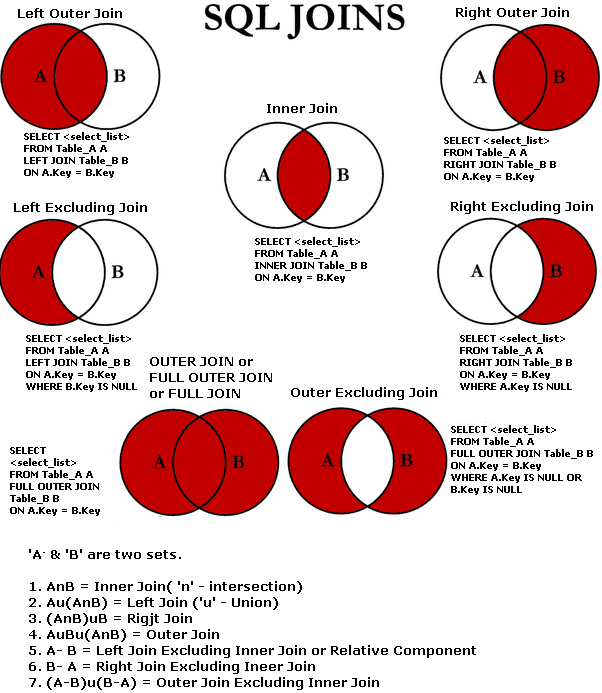
What is Join in SQL SERVER?

The JOIN keyword is used in an SQL statement to query data from two or more tables, based on a relationship between certain columns in these tables.
Join Types
  1. Inner Join
    • Inner Join
    • Equi-Join
    • Natural Join
  2. Outer join
    • Left Join
      • Left Join Excluding Inner Join
    • Right Join
      • Right Join Excluding Inner Join
    • Full Outer Join
      • Outer Join Excluding Inner Join Or Left & Right Joins Excluding Inner Join
  3. Cross Join / Cartesian product
  4. Self Join / Auto Join

Join
The query compares each row of table(@Employee) with each row of table(@Department) to find all pairs of rows which satisfy the join predicate.

Inner Join
The query produces a new result set by combining the column values of both the table @Employee and @Department.
It will produce the resultset if there is atleast one match.

An inner join is a join with a join condition that may contain both equality and non-equality sign whereas an equijoin is a join with a join condition that only contain only equality sign. So we can say an equijoin is a type of inner join containing (Equal)= operator in the join condition.

It is good to know the difference between join and INNER JOIN keyword. Actually there is no difference. If we write JOIN then by default INNER JOIN is performed.

Equi-join or Inner Join
Join based on equality test. Using other operator disqualifies equijoin.

SELECT A.EmpID  ,
       A.EmpName,
       A.DeptID  ,
       B.DeptID ,
       B.DeptName
FROM   @Employee A
       INNER JOIN @Department B
 ON     A.DeptID=B.DeptID
Complex Join Or Inner Join
If join nested then it is called complex join
Jon based on more then one column from each table.

Natural Join
Select the Particular column in Both TableA and TableB. Both table should have same no of columns and names (i.e. Identical columns in both tables). This is accomplished by using union operator in both the select statement.
SELECT EmpID  ,
       EmpName,
       DeptID
FROM   @Employee
UNION --Eliminates duplicates
--UNION ALL --Get all the records from both the table
SELECT EmpID  ,
       EmpName,
       DeptID
FROM   @Employee
Outer Join
Left Outer Join
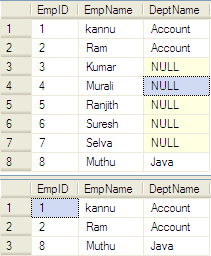
Display all columns in left side and only Match values in right side. Remaining values will be NULL.
SELECT A.EmpID  ,
       A.EmpName,
       A.DeptID  ,
       B.DeptID ,
       B.DeptName
FROM   @Employee A
       LEFT OUTER JOIN @Department B
       ON     A.DeptID=B.DeptID
Left Join Excluding Inner Join
SELECT A.EmpID  ,
       A.EmpName,
       A.DeptID  ,
       B.DeptID ,
       B.DeptName
FROM   @Employee A
       LEFT JOIN @Department B
       ON     A.DeptID=B.DeptID
WHERE B.DeptID IS NULL
Difference between On clause and Where clause when used with left join
SELECT E.EmpID  ,
       E.EmpName,
       D.DeptName
FROM   @Employee             AS E
       LEFT JOIN @Department AS D
       ON     D.DeptID = E.DeptID
       AND
              (
                     D.DeptName = 'Account'
              OR     D.DeptName = 'Java'
              )
              
SELECT E.EmpID  ,
       E.EmpName,
       D.DeptName
FROM   @Employee             AS E
       LEFT JOIN @Department AS D
       ON     D.DeptID = E.DeptID
WHERE (
              D.DeptName = 'Account'
       OR     D.DeptName = 'Java'
       )
Now let us understand ON clause it is apply before JOIN that is why it retrieves all the result of Table2 where there are Flag = 1 but it does not affect Table1 so it retrieves all the rows of table1. When WHERE clause is applied it applies to complete result so it removes all the rows from Table1 and Table2 where Flag is not equal to 1, essentially keeping flag = 1 rows from Table1 and Table2.
Right Outer Join
Just Opposite Of Left Outer Join
SELECT A.EmpID  ,
       A.EmpName,
       A.DeptID  ,
       B.DeptID ,
       B.DeptName
FROM   @Employee A
       RIGHT JOIN @Department B
       ON     A.DeptID=B.DeptID
       

Right Join Excluding Inner Join
SELECT A.EmpID  ,
       A.EmpName,
       A.DeptID  ,
       B.DeptID ,
       B.DeptName
FROM   @Employee A
       RIGHT JOIN @Department B
       ON     A.DeptID=B.DeptID
WHERE A.DeptID IS NULL
Full Outer Join
A full outer join combines the results of both left and right outer joins. The joined table will contain all records from both tables, and fill in NULLs for missing matches on either side.
SELECT A.EmpID  ,
       A.EmpName,
       A.DeptID  ,
       B.DeptID ,
       B.DeptName
FROM   @Employee A
       FULL OUTER JOIN @Department B
       ON     A.DeptID=B.DeptID
Outer Join Excluding Inner Join Or Left & Right Joins Excluding Inner Join
SELECT A.EmpID  ,
       A.EmpName,
       A.DeptID ,
       B.DeptID ,
       B.DeptName
FROM   @Employee A
       FULL OUTER JOIN @Department B
       ON     A.DeptID=B.DeptID
WHERE  A.DeptID IS NULL
OR     B.DeptID IS NULL
Cartesian Product Or Cross Join
Known as Join without condition
ResultSet = No of Rows in TableA * No of Rows in TableB
Display all the Possibilities of combinations.
SELECT *
FROM   @Employee
INNER JOIN @Department
ON 1 = 1

--Explicit
SELECT *
FROM   @Employee
CROSS JOIN @Department

--Implicit
SELECT *
FROM   @Employee, @Department

Self-Join
A table joins with itself with one or two aliases to stave off confusion are called self-join.
SELECT A.EmpName ,
       B.EmpName ,
       A.DeptID  ,
       B.DeptID
FROM   @Employee A
       INNER JOIN @Employee B
       ON     A.DeptID = B.DeptID

References:
codeproject
wikipedia
c-sharpcorner.com
techbubbles
marcoullis
Logical Query Processing

Wednesday, August 18, 2010

asp menu

Table structure for creating the Menu

SET ANSI_NULLS ON
GO
SET QUOTED_IDENTIFIER ON
GO
SET ANSI_PADDING ON
GO
CREATE TABLE [dbo].[MainMenu](
 [MenuID] [int] NOT NULL,
 [ParentMenuID] [int] NULL,
 [LabelMenu] [varchar](100) COLLATE SQL_Latin1_General_CP1_CI_AS NOT NULL,
 [LinkMenu] [varchar](100) COLLATE SQL_Latin1_General_CP1_CI_AS NOT NULL,
 [TargetMenu] [varchar](10) COLLATE SQL_Latin1_General_CP1_CI_AS NOT NULL,
 [HighlightMenu] [varchar](10) COLLATE SQL_Latin1_General_CP1_CI_AS NOT NULL,
 CONSTRAINT [PK_MainMenu] PRIMARY KEY CLUSTERED 
(
 [MenuID] ASC
) ON [PRIMARY]
) ON [PRIMARY]

GO
SET ANSI_PADDING OFF
GO
EXEC dbo.sp_addextendedproperty @name=N'MS_Description', @value=N'Identity Column' ,@level0type=N'USER', @level0name=N'dbo', @level1type=N'TABLE', @level1name=N'MainMenu', @level2type=N'COLUMN', @level2name=N'MenuID'

GO
EXEC dbo.sp_addextendedproperty @name=N'MS_Description', @value=N'Name of the menu.' ,@level0type=N'USER', @level0name=N'dbo', @level1type=N'TABLE', @level1name=N'MainMenu', @level2type=N'COLUMN', @level2name=N'LabelMenu'

GO
EXEC dbo.sp_addextendedproperty @name=N'MS_Description', @value=N'Url for the label' ,@level0type=N'USER', @level0name=N'dbo', @level1type=N'TABLE', @level1name=N'MainMenu', @level2type=N'COLUMN', @level2name=N'LinkMenu'

GO
EXEC dbo.sp_addextendedproperty @name=N'MS_Description', @value=N'Main menu' ,@level0type=N'USER', @level0name=N'dbo', @level1type=N'TABLE', @level1name=N'MainMenu', @level2type=N'COLUMN', @level2name=N'HighlightMenu'

Query to insert records

INSERT INTO dbo.MainMenu
SELECT 1,NULL,'Home,'#,'_self','1' UNION ALL
SELECT 2,NULL,'Accessories,'#,'_self','2' UNION ALL
SELECT 3,NULL,'Products,'#,'_self','3' UNION ALL
SELECT 4,NULL,'Contact,'#,'_self','4' UNION ALL
SELECT 5,2,'Accessory1,'#,'_self',NULL UNION ALL
SELECT 6,3,'Product1,'#,'_self',NULL UNION ALL
SELECT 7,3,'Product2,'#,'_self',NULL UNION ALL
SELECT 8,5,'Accessory2,'#,'_self',NULL UNION ALL
SELECT 9,5,'Accessory3,'#,'_self',NULL UNION ALL
SELECT 10,8,'Acc,'#,'_self',NULL
Query to generate Insert statements
SELECT 'SELECT ' + CAST(MenuID AS VARCHAR) +',' + COALESCE(CAST(ParentMenuID AS VARCHAR), 'NULL')+ ',''' + LabelMenu + ','''+ LinkMenu + ','''+ TargetMenu + ''','+ (CASE WHEN HighlightMenu IS NULL OR HighlightMenu = '' THEN 'NULL' ELSE +''''+ HighlightMenu +'''' END) + ' UNION ALL' FROM dbo.MainMenu

C# Code
protected void Page_Load(object sender, EventArgs e)
    {
        if (!IsPostBack)
        {
            PopulateMenu();
        }
    }

    private void PopulateMenu()
    {
        //Get the menu structure from the table
        DataSet dsMenu = GetDataSetForMenu();

        foreach (DataRow drDataRow in dsMenu.Tables["Menu"].Rows)
        {
            //If the ParentMenuID is NullOrEmpty then it is the top most menu
            if (string.IsNullOrEmpty(Convert.ToString(drDataRow["ParentMenuID"])))
            {
                MenuItem mainMenuItem = new MenuItem((string)drDataRow["LabelMenu"], Convert.ToString(drDataRow["MenuID"]));
                Menu1.Items.Add(mainMenuItem);
                //CreateSubMenu(dsMenu, drDataRow, mainMenuItem);
            }
            else //Otherwise it is the submenu
            {
                CreateSubMenu(dsMenu, drDataRow, new MenuItem());
            }
        }
    }

    private void CreateSubMenu(DataSet dsSubMenu, DataRow drDataRow, MenuItem mainMenuItem)
    {
        //MenuID is the subMenu of the ParentMenuID
        //string MenuID = Convert.ToString(drDataRow["MenuID"]);
        string ParentMenuID = Convert.ToString(drDataRow["ParentMenuID"]);

        //Which is always true
        if (mainMenuItem.Text == string.Empty)
        {
            //If it is the firstChild of the parent find it here itself
            mainMenuItem = Menu1.FindItem(Convert.ToString(drDataRow["ParentMenuID"]));
            //If we can't able to find it in the main menu we have to look for sub-menu
            if (mainMenuItem == null)
                foreach (MenuItem mi in Menu1.Items)
                {
                    //Find the ParentMenu by ParentMenuID
                    mainMenuItem = GetParentMenuItem(mi, Convert.ToString(drDataRow["ParentMenuID"]));
                    if (mainMenuItem == null)
                        continue;
                    if (!mainMenuItem.Text.Trim().Equals(string.Empty))
                        break;
                }
        }

        if (mainMenuItem == null)
            return;
        //This the child element
        if (!string.IsNullOrEmpty(ParentMenuID))
        {
            MenuItem childrenItem = new MenuItem((string)drDataRow["LabelMenu"], Convert.ToString(drDataRow["MenuID"]));
            childrenItem.Target = (string)drDataRow["LinkMenu"];
            mainMenuItem.ChildItems.Add(childrenItem);
        }
    }

    // Recursive function   
    private MenuItem GetParentMenuItem(MenuItem root, string value)
    {
        MenuItem menuItem;
        //Is MenuItem has ChildItems
        if (root.ChildItems.Count > 0)
        {
            //Check which ChildItems is the Parent
            for (int i = 0; i < root.ChildItems.Count; i++)
            {
                menuItem = GetParentMenuItem(root.ChildItems[i], value);
                if (menuItem != null)
                    return menuItem;
            }
        }
        if (root.Value == value)
        {
            return root;
        }
        else
            return null;
    }

    private DataSet GetDataSetForMenu()
    {
        String constr = "Server=10.16.105.171;Database=test;Uid=test;Pwd=test123;Connect Timeout=0; pooling='true'; Max Pool Size=200";
        String query = @"SELECT MenuID, ParentMenuID, LabelMenu, LinkMenu FROM dbo.MainMenu ORDER BY MenuID ASC";
        DataSet dsMenu = new DataSet();

        using (SqlConnection conn = new SqlConnection(constr))
        {
            SqlDataAdapter da = new SqlDataAdapter(query, conn);
            da.Fill(dsMenu);
            da.Dispose();
        }

        dsMenu.DataSetName = "Menus";
        dsMenu.Tables[0].TableName = "Menu";
        DataRelation relation = new DataRelation("ParentChild",
                                dsMenu.Tables["Menu"].Columns["MenuID"],
                                dsMenu.Tables["Menu"].Columns["ParentMenuID"], true);

        relation.Nested = true;
        dsMenu.Relations.Add(relation);

        //This constraint cannot be enabled as not all values have corresponding parent values.

        return dsMenu;
    }
Reference Exception: This constraint cannot be enabled as not all values have corresponding parent values. We will get this exception if we set 0 for ParentMenuID. Where the LabelMenu is parent. Since there is no MenuID with value 0

Monday, August 16, 2010

ArrayList to List Conversion

ArrayList To List
List newList = new List(arrayList.ToArray(typeof(int)));
List newList = new List(arrayList.ToArray(typeof(string)));